
Start with the customer’s request.
Service enquiries often arrive before you know the full scope. A customer may need an inspection, a consultation or an estimate. Record what they have asked for, who will respond and what information is still needed. You can organise this first conversation in Essentials without setting up a full delivery process.
More detail
One supports product businesses and mixed businesses too. This page focuses on a service example; it is not a limit on who can use the CRM.
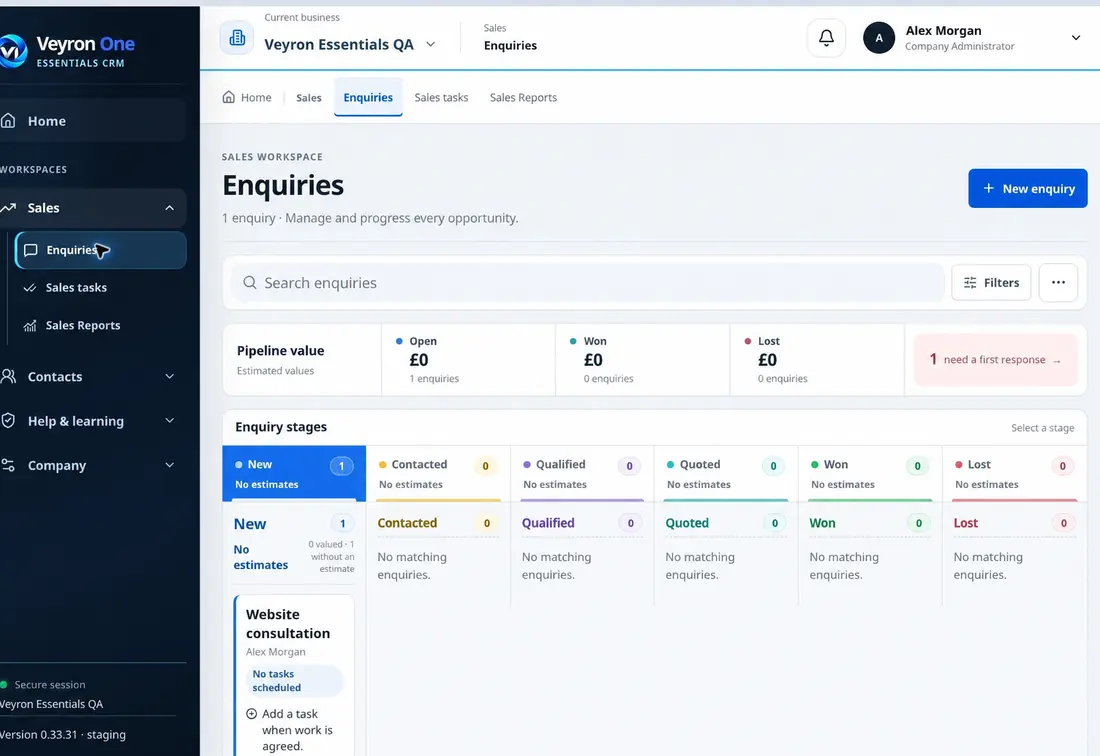
Example: from electrical enquiry to an agreed visit.
- Capture the request: a customer asks about additional sockets. Keep their contact details and the original request together.
- Agree the follow-up: assign a task to confirm the location, access and scope.
- Prepare the next step: update the enquiry after the call. In Professional, prepare a quote or arrange an appointment where the enabled modules support it.
- Keep the context: record the customer’s decision and continue into the appropriate work records.
This is an illustrative workflow, not a promise that every industry-specific process is automated.
Choose tools around the work.
Essentials is useful when the immediate need is customer records, enquiries and follow-ups. Professional adds connected quotes, jobs and projects, appointments, invoice records and customer portals. Team includes Professional functionality with five licences.
More detail
Specialist requirements such as regulated advice, conveyancing case management or industry certification may still need dedicated systems. Use One for its verified customer and work-management capabilities, and discuss your specific workflow before relying on a specialist integration.
Your questions, answered
Can I start without changing my whole process?
Yes. Start with customer records and new enquiries, then organise follow-ups. Add Professional tools when they are useful for the work you deliver.
Can my colleagues help manage enquiries?
You can add licences and invite colleagues within your allowance. Roles and permissions determine their access, and owners identify who is responsible for supported work.
Put your next step in One.
Essentials includes one licence. Professional tools require the relevant plan and permissions.