
What does a CRM actually do?
A CRM brings useful customer details, requests and activity into a shared system. It helps a team answer three practical questions: who is the customer, what do they need, and what should happen next?
More detail
Without that shared context, the next person to respond may need to search an inbox, check a spreadsheet and ask a colleague what was agreed. A CRM makes the relevant record easier to find and update. It is most useful when the team keeps it accurate and uses it consistently.
Four records, four different jobs.
- Customer Card
- The customer’s useful identity and contact information, connected to their requests and related history.
- Enquiry
- A particular request or conversation about potential work. The same customer can have more than one enquiry.
- Task
- A piece of work someone needs to do, such as calling a customer or preparing an answer.
- Activity
- A relevant note, contact or system event that gives context to what happened.
A pipeline stage describes where an enquiry stands. It is not a substitute for the task that moves the conversation forward.
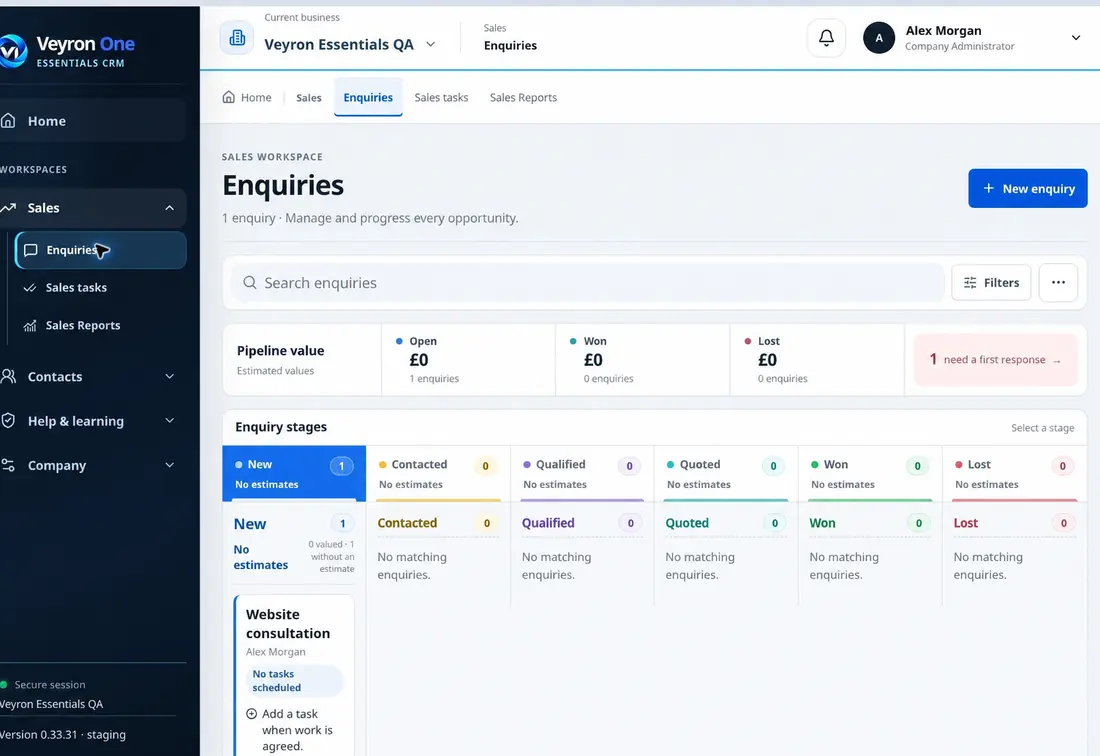
A practical customer example.
A business contacts you about new equipment. Record their contact details on a Customer Card and their request as an enquiry. Assign an owner and create a task to clarify the requirements. After the call, record the useful outcome and agree the next action.
More detail
If the work develops into a proposal, Professional can connect quote records with the customer journey. The CRM should make the handover clearer; the exact process still depends on what you sell and which modules are enabled.
What should you organise first?
- Agree the customer details your team needs to respond.
- Use stages that describe real conversations, not internal guesswork.
- Give each active enquiry a responsible owner and a next action.
- Review due and overdue tasks, then update the record after contact.
Start with a manageable routine rather than collecting every possible field. Keep sensitive or unrelated information out of general notes and choose access appropriately.
Choose a CRM around your work.
Look at the customer journey you need to support, the people who will use the system and the information customers need to see. Essentials covers core customer and enquiry management. Professional adds connected work tools, and Team provides Professional functionality with five licences.
More detail
Explore actual Veyron ONE screens and compare the current plans before deciding.
Put your next step in One.
Essentials includes one licence. Professional tools require the relevant plan and permissions.